
Screenshots
App details
- Updated
- Apr 8, 2009
- Language
- Spanish,English
- Developer
- Darik Horn
- Category
- Mobile
SoftPas in:
This product is also available in the following languages:
About Darik's Boot And Nuke
Download Darik's Boot And Nuke – Secure Data Erasure, Disk Wiping, Data Destruction, Hard Drive Sanitization, Bootable Disk Utility
Overview
Darik's Boot And Nuke (DBAN) is a specialized boot disk utility designed to securely erase all data from disk drives, making it an essential tool for data sanitization. The application enables users to permanently delete information from storage devices, ensuring that sensitive data cannot be recovered through forensic methods. This capability is particularly critical when preparing computers for resale, donation, or recycling, where data privacy is paramount. DBAN is tailored for users who require a reliable, no-compromise solution for complete disk wiping, including IT professionals, system administrators, and privacy-conscious individuals. The software operates independently of the host operating system, launching from a bootable medium such as a USB drive or CD/DVD, which ensures that the entire disk can be overwritten without interference from existing system processes. Although the developer did not provide additional technical details about the underlying algorithms, DBAN is widely recognized for its adherence to secure data destruction standards. Real-world use cases include corporate data disposal, compliance with data protection regulations, and personal device cleanup. In the broader app ecosystem, DBAN fills a niche role as a dedicated utility for irreversible data deletion, offering a level of security that standard formatting tools cannot match.
Key Features & Functionality
- Bootable Storage Options: DBAN supports installation on both USB devices and CD/DVDs, providing flexibility for users based on their hardware capabilities. This dual support ensures compatibility with a wide range of systems, including older machines that may not support USB booting.
- Irreversible Data Deletion: Once data is erased using DBAN, it becomes irretrievable through conventional or advanced recovery methods. This feature is vital for users who must comply with data protection policies or prevent identity theft.
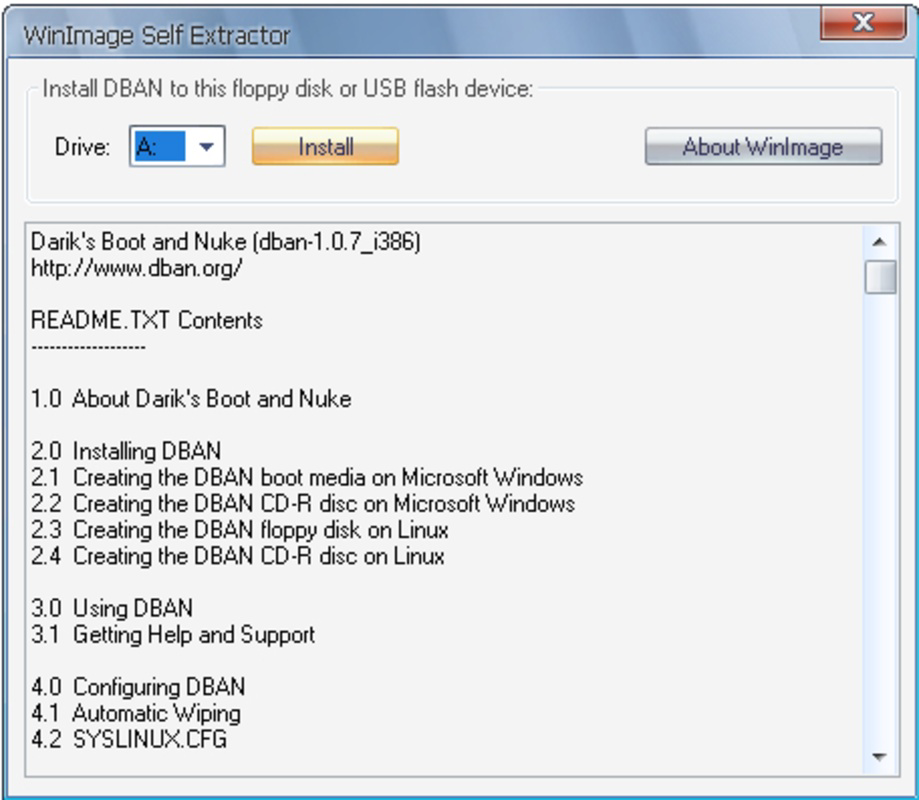
- User-Friendly Installation: The installation process is straightforward—users select their preferred storage device and follow on-screen prompts. The clarity of the interface makes it accessible even to those with limited technical expertise.
- Boot Order Configuration: To use DBAN, users must reboot their computers and adjust the boot order in the BIOS or UEFI settings. While this step is generally simple, some systems may lack USB boot support, which users should verify beforehand.
- Comprehensive Disk Formatting: DBAN performs a full overwrite of all data on the target disk, ensuring no remnants remain. This makes it ideal for extensive reformatting tasks, such as preparing machines for reuse or secure disposal.
For example, a business transitioning to new hardware can use DBAN to wipe old drives before shipping them to a recycling center. Similarly, an individual selling a used laptop can use DBAN to ensure no personal files remain on the drive. The software’s ability to operate outside the operating system gives it a significant advantage over standard deletion methods.
Interface, UX & Performance
DBAN features a minimalistic, text-based interface that prioritizes functionality over visual polish. The user experience is focused on clarity and direct control, with menu-driven navigation that guides users through the wiping process. While the interface lacks graphical elements, it is designed for efficiency and reliability, which aligns with the tool’s purpose as a low-level utility. Navigation is linear and predictable, with clear prompts for selecting target drives and choosing wiping methods. The software does not require internet access during operation, enhancing its reliability in isolated environments. Although the developer did not list formal performance metrics, DBAN is known to efficiently process large drives, with the time required depending on the drive size and selected wiping algorithm. Performance may vary across device categories, such as HDDs versus SSDs, though no specific benchmarks were provided. Responsiveness is consistent during active operations, with no reported instability or crashes. The application remains stable throughout the wiping process, even on older hardware. Overall, the UX is optimized for purpose-driven use rather than aesthetic appeal, making it suitable for users who value security and precision over modern design trends.
Platform Compatibility & Technical Requirements
Darik's Boot And Nuke is available for Windows, Linux, and Mac platforms, offering broad cross-platform support. The software is distributed as a bootable image that can be written to USB drives or optical media, enabling use across diverse hardware environments. The current version is 2.3.0, with a file size of 100 MB, making it lightweight and easy to store or transfer. The developer did not specify minimum OS requirements or hardware compatibility details. Compatibility information was not fully disclosed, so users should verify their system’s ability to boot from USB or CD/DVD before proceeding. The application does not require installation on the host system; instead, it runs directly from the bootable medium. This approach enhances security and ensures that the wiping process is not influenced by the host operating system. Users should ensure that their device supports booting from external media, as this is a prerequisite for using DBAN effectively.
Pros and Cons
Pros
- Free to download and use, making it accessible to individuals and organizations alike.
- Supports multiple bootable media types, including USB and CD/DVD.
- Ensures data is irretrievable after deletion, meeting high-security standards.
- Simple installation process with clear on-screen instructions.
- Operates independently of the host operating system, enhancing reliability.
Cons
- Requires manual boot order configuration, which may be challenging for novice users.
- Text-based interface may feel outdated or intimidating to non-technical users.
- Does not provide real-time progress tracking or visual feedback during wiping.
- Specific system requirements were not listed, potentially leading to compatibility issues.
- Only available as a bootable image; no native app version for smartphones or tablets.
FAQ
Is DBAN safe to use?
Yes, DBAN is safe to use when applied correctly. However, it permanently erases all data on the selected drive, so users must ensure they have backed up any important files before proceeding.
Can I use DBAN on SSDs?
Yes, DBAN can be used on SSDs, but users should be aware that the effectiveness of certain wiping algorithms may vary due to SSD-specific behaviors like wear leveling and TRIM.
Do I need to install DBAN on my computer?
No, DBAN does not need to be installed on the host system. It runs from a bootable USB or CD/DVD, allowing it to operate independently of the existing operating system.
How long does a DBAN wipe take?
The duration depends on the drive size, speed, and selected wiping method. Larger drives and more thorough algorithms will take longer, potentially several hours.
Is DBAN available for mobile devices?
No, DBAN is not available as a mobile app. It is designed to run only from bootable media and does not have a native version for Android or iOS devices.
Final Thoughts
Darik's Boot And Nuke remains a trusted solution for secure data erasure, offering a reliable method to permanently destroy information on disk drives. Its ability to operate independently of the host system, combined with irreversible data deletion, makes it indispensable for users who prioritize data privacy and compliance. While the interface is basic and requires technical know-how for boot configuration, the software’s functionality and security are unmatched for its intended purpose. It is particularly valuable for IT professionals, organizations handling sensitive data, and individuals preparing devices for disposal. The fact that it is free and open to all further enhances its appeal. For anyone needing to sanitize a hard drive with confidence, DBAN delivers on its core promise. Download Darik's Boot And Nuke now.
Guides & Tutorials
How to install Darik's Boot And Nuke
- Click the Download button above.
- Once redirected, accept the terms and click Install.
- Wait for the Darik's Boot And Nuke download to finish on your device.
How to use Darik's Boot And Nuke
This software is primarily used for its core features described above. Open the app after installation to explore its capabilities.
User Reviews
No reviews yet. Be the first to share your experience.
You may also like
more
Que no te pillen¡
About !Que no te pillen¡Reviewed by Jason A. BilbreyShow MoreShow Less

3D Combat Zone
About 3D Combat ZoneOriginally released in 1983, 3D Combat Zone immerses players...

666: El día del portal
About 666: El día del portalOn June 6, 2006, Agent P. Stone uncovers a sinister...

80 in 1 Best Flash games
About 80 in 1 Best Flash games 80 in 1 Best Flash games is a collection of 80 fl...

ABYSS SEEKERーーWhat Do You See Deep in The Abyss
About ABYSS SEEKERーーWhat Do You See Deep in The AbyssIn ABYSS SEEKER, players...

ACA NEOGEO THE KING OF FIGHTERS 2002 for Windows
About ACA NEOGEO THE KING OF FIGHTERS 2002 for WindowsTHE KING OF FIGHTERS 2002,...